

Most bad agentic loops are just cron jobs with an expensive assistant attached.
They wake on a fixed schedule. They think even when nothing changed. They produce a summary. Someone calls it autonomy.
That criticism is fair.
But it misses the useful version.
An agentic loop is not a process that runs all the time. It is a recurring business job with memory, authority, verification, and a reason to wake up again.
Cron asks: is it time?
An agentic loop asks: did something change enough to deserve attention?
That is the whole difference.
Short version
- Use cron for fixed repetition.
- Use workflow automation for known paths.
- Use agentic loops for recurring judgment.
- A good loop can decide to wait.
- Every loop needs a journal.
- Every loop should schedule the next useful run, not blindly run again.
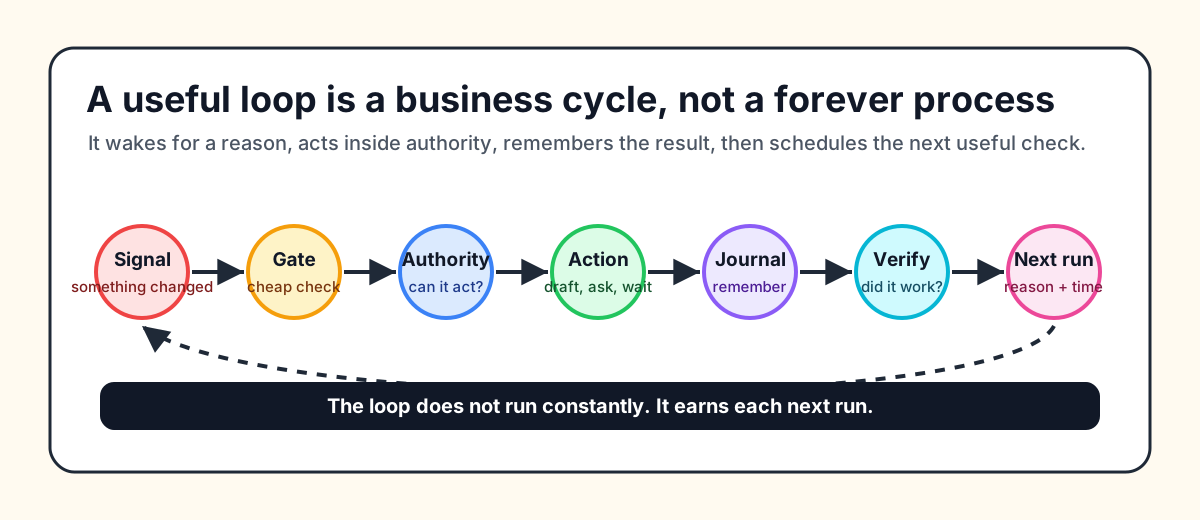
What is an agentic loop?
An agentic loop is a stateful business process.
An AI assistant watches signals, decides whether action is useful, respects authority rules, records what happened, verifies the outcome later, and schedules the next check based on evidence.
The simplest agentic loop definition is:
An agentic loop is a recurring AI process that observes a signal, decides whether action is useful, acts within authority, records the run, verifies the result, and chooses the next useful check.
That definition has six parts:
- signal
- decision
- action or no action
- authority
- journal
- verification
This is why agentic loops matter for AI business automation. Many recurring jobs do not need background agents.
They need cron.
The practical debate is not "cron vs agents" for every task. It is deciding which recurring jobs are fixed automation, which are workflow automation, and which deserve an AI loop with memory and judgment.
Cron vs workflow vs loops
| Job type | Best fit | Good examples | Bad fit |
|---|---|---|---|
| Cron job | Fixed time | Backups, cache refreshes, log rotation, static reports | Anything that needs judgment |
| Workflow automation | Known path | Payment failed, send reminder, wait, retry, escalate | Messy diagnosis with many possible causes |
| Agentic loop | Recurring judgment | Feedback clusters, SEO decay, production bugs, stale leads | Deterministic repetition |
Cron is excellent software. It runs a command at a fixed time. That is exactly right for backups, cache refreshes, log rotation, and static reports.
Workflow automation sits in the middle. If a Stripe payment fails, send reminder 1. If payment is still missing, send reminder 2. If the customer is high value, ask the owner first. That path can be drawn as rules.
Agentic loops become useful when the next step cannot be reduced to clean rules without creating a brittle mess.
Examples:
- customers say onboarding is confusing, but the fix could be docs, product copy, support replies, a bug fix, or no action
- search traffic decays, but the right move could be a title change, internal links, a new page, a technical fix, or no action
- a production error repeats, but the right response could be wait, create an issue, open a patch, roll back, or ask for approval
That is not a clock problem.
It is an attention problem.
Good loops wake less often
Bad AI loops burn budget because they wake the assistant for every scheduled check.
Good AI loops use a cheap gate first.
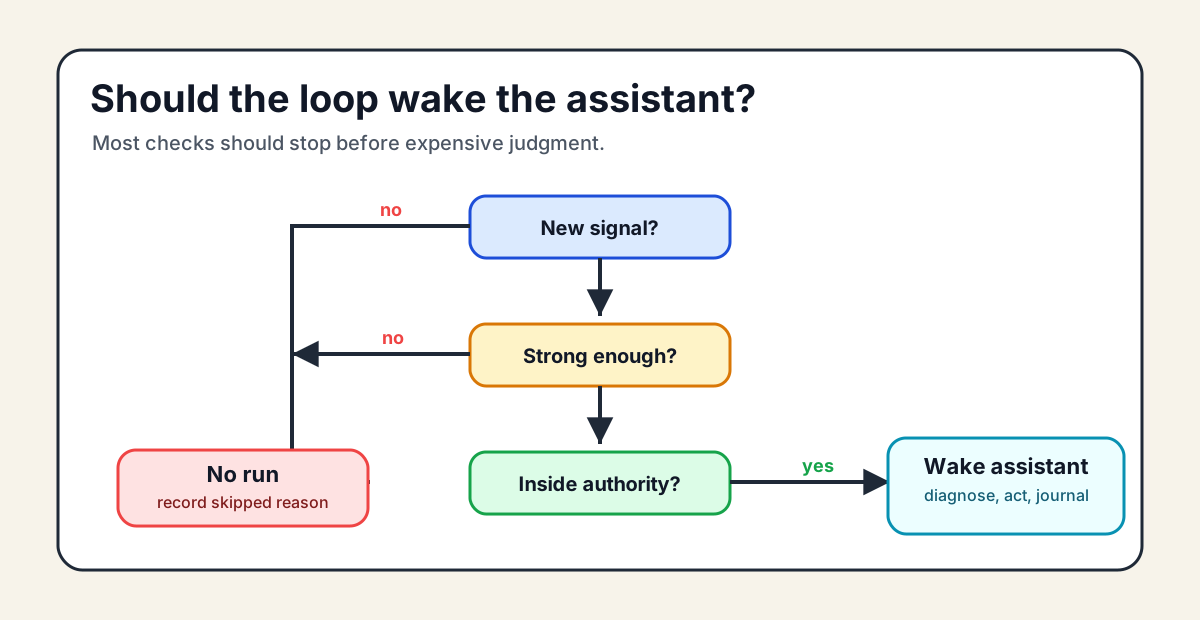
The cheap gate asks simple questions:
- did new data arrive?
- did a metric cross the threshold?
- did a customer reply?
- is approval still pending?
- is the verification window over?
- did this loop already try the same action?
If the answer is no, the assistant should stay asleep.
This is the point many critics miss. A good background agent should wake less often than a bad cron job.
The anatomy of a useful loop
A loop should be boring to inspect.
It needs five things.
1. Outcome
Not "monitor support."
Better:
"Turn repeated customer feedback into the smallest useful fix, docs update, customer reply, roadmap evidence, or no action."
The outcome stops the assistant from inventing work.
2. Signals
Signals are the reasons to wake up.
Examples:
- three customers report the same friction
- a paying user hits the same error twice
- a page loses clicks for seven days
- an invoice becomes overdue
- a connector stops syncing
No signal means no run.
3. Authority
Autonomy is not a mood. It is a permission system.
A loop should know what it can read, draft, execute, and escalate.
Reading data can often be automatic. Drafting can often be automatic. Sending customer emails, changing billing, merging code, deploying, refunding, or spending money should usually require approval.
The assistant should never raise its own authority.
4. Journal
Every loop needs memory.
Not a raw log dump. A useful journal.
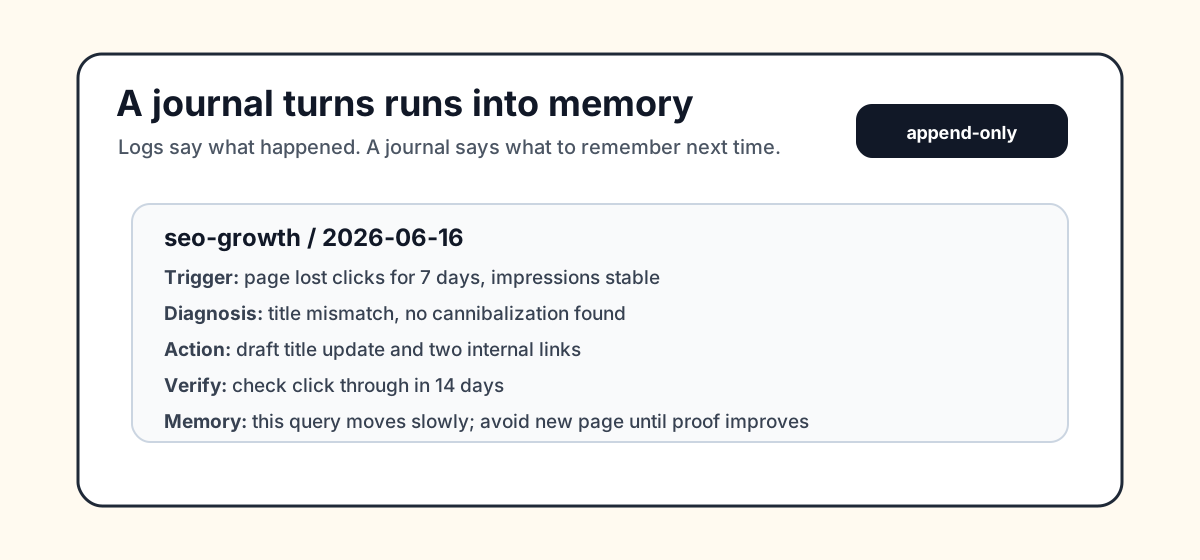
Each entry should record:
- why the loop woke up
- what it inspected
- what it diagnosed
- what it did or proposed
- what needs approval
- when to verify
- what happened later
- what should be remembered next time
Without a journal, every run starts cold.
With a journal, the loop can learn that a fix pattern failed, a channel takes 21 days to show movement, or a signal is usually noise.
5. Adaptive scheduling
Every run should end with a next check.
Not just a timestamp. A reason.
{
  "nextRun": {
    "at": "2026-06-17T14:00:00.000Z",
    "reason": "PR opened; check after CI finishes",
    "confidence": "medium"
  }
}
Cron can wake the scheduler.
The loop decides whether another run is useful.
Three concrete examples
The WIP win-loops catalog treats loops as readable Markdown packs. You can inspect the public proof file here: win-loops catalog proof.
Each pack has a LOOP.md contract, a scoped SKILL.md, a journal.md, examples, and evals.
Bug Autofix
The bad cron version:
"Every hour, check Sentry and ask the assistant to fix bugs."
The loop version wakes only when an error crosses a threshold, affects paying users, appears after a deploy, or touches a critical flow like signup, checkout, payment, export, or admin access.
Then it separates facts, assumptions, missing context, suspect files, and safest next action. It can create an issue, draft a patch brief, request approval, and verify after the fix ships.
The value is not "AI fixes bugs."
The value is production error attention with gates, authority, tests, verification, and memory.
Feedback to Fix
The bad cron version:
"Every day, summarize support tickets."
The loop version wakes when a high value customer reports a blocker, three users report similar friction, a support answer fails, or churn feedback mentions product pain.
Then it chooses the smallest useful action:
- docs update
- reply draft
- issue
- fix brief
- roadmap evidence
- no action
Treating every complaint as a feature request creates a bad roadmap. A good loop protects you from that.
SEO Growth
The bad cron version:
"Publish an SEO article every Monday."
That is how thin content happens.
The loop version waits for evidence: a valuable page loses clicks, a query sits near page one, a title has weak click through, or a customer phrase creates search demand.
Then it chooses one action: improve the title, deepen the page, add internal links, draft a new page, fix schema, or do nothing.
SEO is a perfect loop because action and proof are separated by time. A title change might need 14 days. A page refresh might need 21 days. A new page might need 28 days.
Cron runs on a calendar.
SEO needs memory of delayed outcomes.
How this maps to win.sh
win.sh is built around one business assistant that learns, monitors, acts, and earns autonomy under supervision.
The interesting unit is not the agent.
It is the loop.
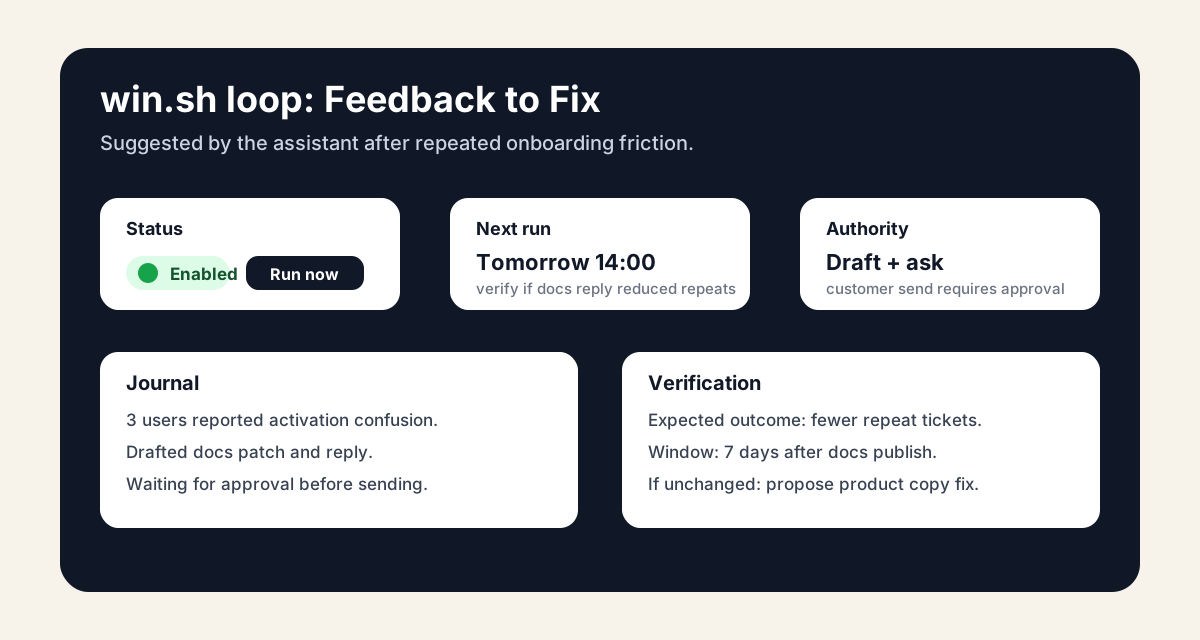
A win.sh loop should be visible in the interface:
- enabled or disabled
- manual run button
- next run and reason
- last run summary
- required connectors
- authority level
- budget behavior
- journal
- artifacts
- verification window
The assistant should also be able to suggest loops.
If it sees repeated onboarding friction, it can propose an Activation Optimizer loop. If it sees repeated failed payments, it can propose a Failed Payment Recovery loop. If it sees the same manual weekly task, it can ask: "Should I turn this into a loop?"
That is useful autonomy: suggested, bounded, inspectable, and reversible.
When not to use an agentic loop
Do not build an agentic loop when:
- cron is enough
- a deterministic script is enough
- workflow automation has a known path
- there is no measurable outcome
- the action is too risky to automate
- nobody will read the journal
- the assistant cannot access the required data
- the loop cannot choose no action
The rule is simple:
Cron for fixed repetition.
Workflow automation for known paths.
Agentic loops for recurring judgment.
FAQ
What is the difference between a cron job and an agentic loop?
A cron job runs a fixed command at a fixed time. An agentic loop watches business signals, decides whether anything deserves attention, acts within authority, records what happened, verifies the outcome, and schedules the next useful check.
Are agentic loops more expensive than cron jobs?
Bad loops are expensive because they wake the assistant on every schedule. Good loops use cheap gates first and spend budget only when judgment is needed.
Can workflow automation replace agentic loops?
Sometimes. If the path is known, use workflow automation. If the next action depends on messy business judgment, delayed proof, approval boundaries, and memory across runs, use an agentic loop.
What should an agentic loop record?
It should record the signal, diagnosis, action, expected outcome, verification date, actual outcome, approval state, and learning. Failed attempts should stay in the journal so the loop does not repeat them blindly.
When should an agentic loop do nothing?
It should do nothing when evidence is weak, the signal is stale, the action is outside authority, access is missing, another loop already owns the problem, or the safest next step is to wait.
Is an agentic loop the same as an autonomous agent?
No. An autonomous agent is the assistant. An agentic loop is a recurring business job that the assistant can run under a contract. One assistant can run many loops for the same company.
How does win.sh use agentic loops?
win.sh uses supervised business assistants with memory, budget controls, authority rules, approval requests, traces, and scheduled or event-driven wakes. Agentic loops turn recurring work into named, inspectable jobs with journals and verification.
The final test
Before calling something an agentic loop, ask five questions:
- Can it choose to do nothing?
- Can it explain why it woke up?
- Can it say what changed since last time?
- Can it record what happened in a journal?
- Can it decide the next useful check instead of blindly running again?
If the answer is no, it is probably just cron.
That is fine. Cron is great.
Just do not call it a loop.
Related reading
- AI Agents vs ChatGPT: The Real Difference
- Best Agentic AI Tools for Business
- Agentic Automation for Business
- AI Agents for Business Operations
- How to Give Your AI Agents a Budget
- The One-Person Company, Powered by AI Agents
- win.sh vs Make
- crontab manual for the baseline: fixed time-based execution.
- OpenAI guide to building agents for agent runs, actions, guardrails, and exit conditions.
- Anthropic on building effective agents for simple production patterns and memory.
- Temporal on dynamic AI agents for durable execution across failures.